This article will walk you through the basics of file I/O and in the end, You will be able to build your own storage service just like shared preference using Dart: IO library.
Our main aim is to dig deep into Flutter file I/O so for that, we are creating our own shared preferences just to learn the basics of file I/O.
Shared preferences in flutter allow the developer to store some sort of state weather it’s related to user data like the day-night theme or some app-level data which we want to persist even after closing the app.
Let’s start by jumping straight into our Database Code for Complete Code along with UI checkout the above git repository.
//Function to get all the data in json format Future<Map> getData({String key}) async { File tempFile = await _localFile; if (await tempFile.exists()) { return json.decode(tempFile.readAsStringSync()); } else return null; }
//To delete data if exist in the file Future deleteData( String dataToDelete, Function onDelte, Function ifNotExist) async { File tempFile = await _localFile; if (!tempFile.existsSync()) { ifNotExist(); } else { Map data = json.decode(tempFile.readAsStringSync()); var result = data.remove(dataToDelete); if (result == null) { ifNotExist(); } else { tempFile.writeAsStringSync(json.encode(data)); onDelte(); } } } }
In the above code we are Interacting with files on our device using dart.io library the above code replicates the same functionality of shared Preferences.
Let’s take a look at each and every function one by one :
localPath() : In localpath() we are accessing document directory using path provider package by calling getApplicationDocumentsDirectory(); method. This function returns a path of type string, we will be using this path for storing our Database file.
localFile(): Now as we got our path from localPath() , We are now creating a file of type JSON using the path we got from localPath() and returning a File as an output return File(‘$path/preference.json’);
writeData(): In this, we are first storing the file reference in a file variable File file = await _localFile; now we can access the same file, Now we create a temporary map and store the JSON file in it by parsing it using json.decode() tempMap = json.decode(file.readAsStringSync()); , After that, we add the new map to the tempMap variable using tempMap.addAll(data); now we right back the updated data by using json.Encode file.writeAsStringSync(json.encode( tempMap));
getData(): This function returns a future Map if the file exist this function returns all the data present in the file by calling json.decode(tempFile.readAsStringSync()); .
deleteData(): It takes three-parameter, Last two parameters (onDelete,ifNotExist) is called when the file got successfully deleted or when the file doesn’t exist. The first parameter takes a key of type string and removes that key-value pair if it exists using data.remove(dataToDelete); , This function (data.remove( )) returns null if the file dosent exist and returns the value if it exist .
Conclusion
In this article we learned how to do basic file I/O operations in flutter and alongside we also learned how to parse JSON file using dart: convert library and accessing the device storage using path_provider package. Now go on and create your own file storage system or customize it as per your need ,Sky is the limit 🙃🙃🙃.
Trusted across industries like manufacturing, healthcare, logistics, BFSI, and smart cities, Aeologic combines innovation with deep industry expertise to deliver future-ready solutions.
FlutterDevs team of Flutter developers to build high-quality and functionally-rich apps. Hire flutter developer for your cross-platform Flutter mobile app project on an hourly or full-time basis as per your requirement! You can connect with us on Facebook, GitHub, Twitter, and LinkedIn for any flutter related queries.
Wewelcome feedback and hope that you share what you’re working on using #FlutterDevs. We truly enjoy seeing how you use Flutter to build beautiful, interactive web experiences!.
Google, the search giant recently rolled out the new stable version of its Extensive Popular Cross-Platform UI Framework Flutter.
Flutter 1.20 & Dart 2.9 have been released simultaneously this time with apparently Substantial Performance Improvements from their contemporary releases . Flutter is now equipped for building apps for iOS, Android, Fuchsia, web & Desktop with new platform support on talks with Ubuntu for Linux apps, Microsoft’s Android Surface Duo, and Windows 10X devices will also be soon available.
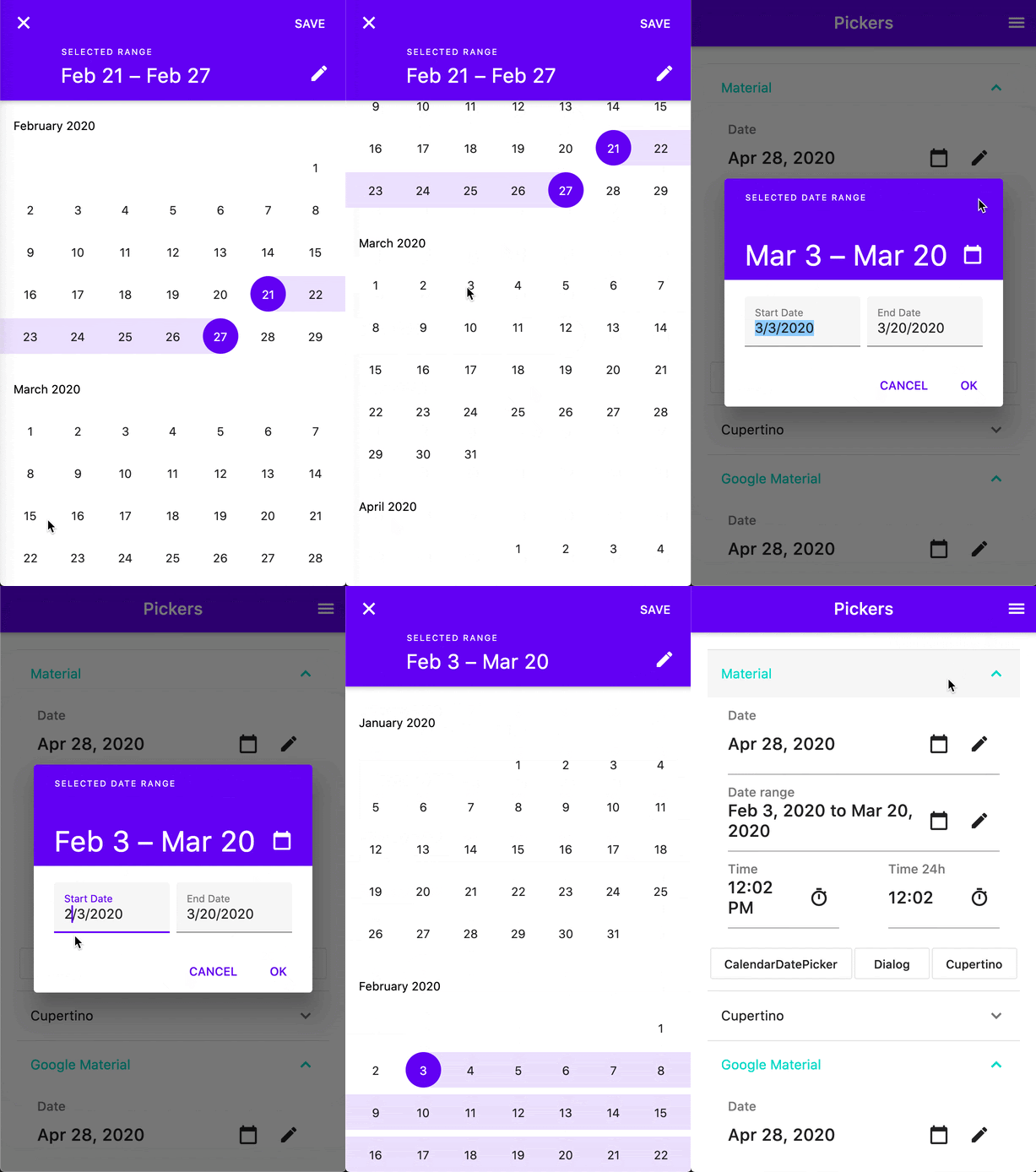
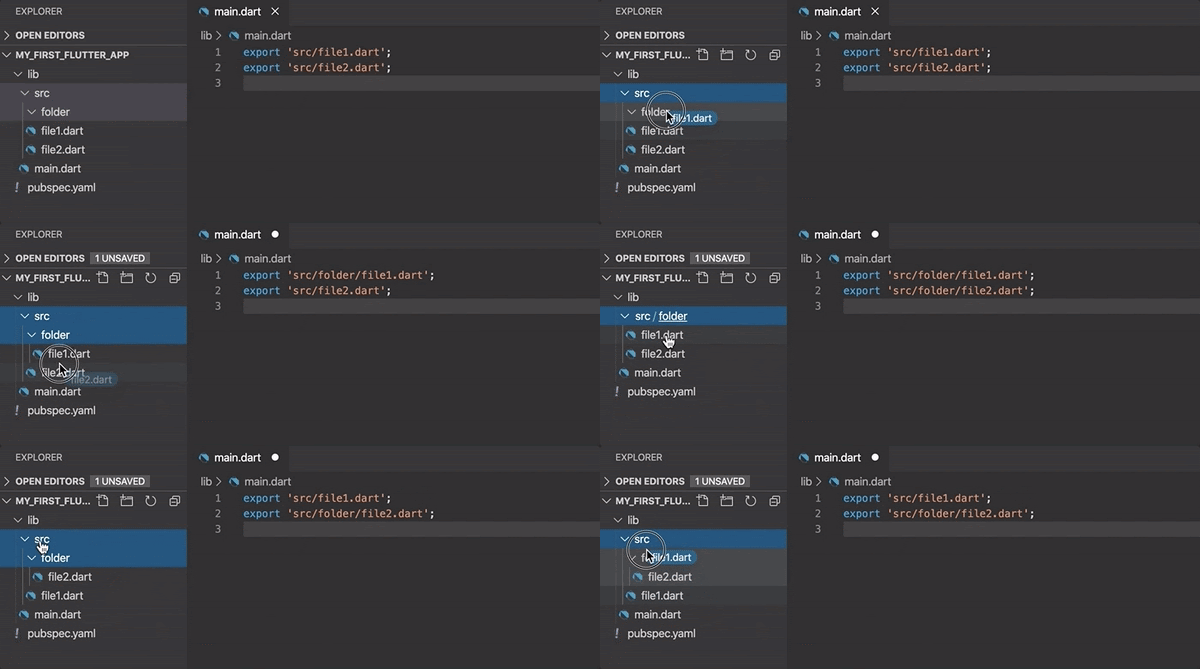
Some Prominent advancements are Reduced size & Latency, less janky starting animations, and faster handling of UTF-8 strings, mouse cursor support, new widgets like Interactive viewer making pan, zoom & drag-n-drop easier, range slider & date picker revamped, newly flutter browser variant of dart dev tools, and its embedding in the new VS Code extension keeping all in one window frame for better debugging, Integrating flutter to the existing app made convenient with Pigeon, improved support for Metal on iOS, and new Material widgets.
4 Main Pillar Improvements this release mainly focusses are :
4 main pillar flutter release is focussed on
There is a lot in the release and a lot is yet to come but to sum it up in a Blog
Some of the Key Announcements In Release are ::>
Interactive Viewer : Newly Added Widget
The interactive Viewer widget is Added In the Newly Update providing flutter the Ability to Enable Pan, Resize, Zoom & Drag-n-Drop like Simple Interactions in Flutter Apps.
To Learn How To Embed Your Apps with the Interactive Viewer Widget Checkout the Flutter API documentation :
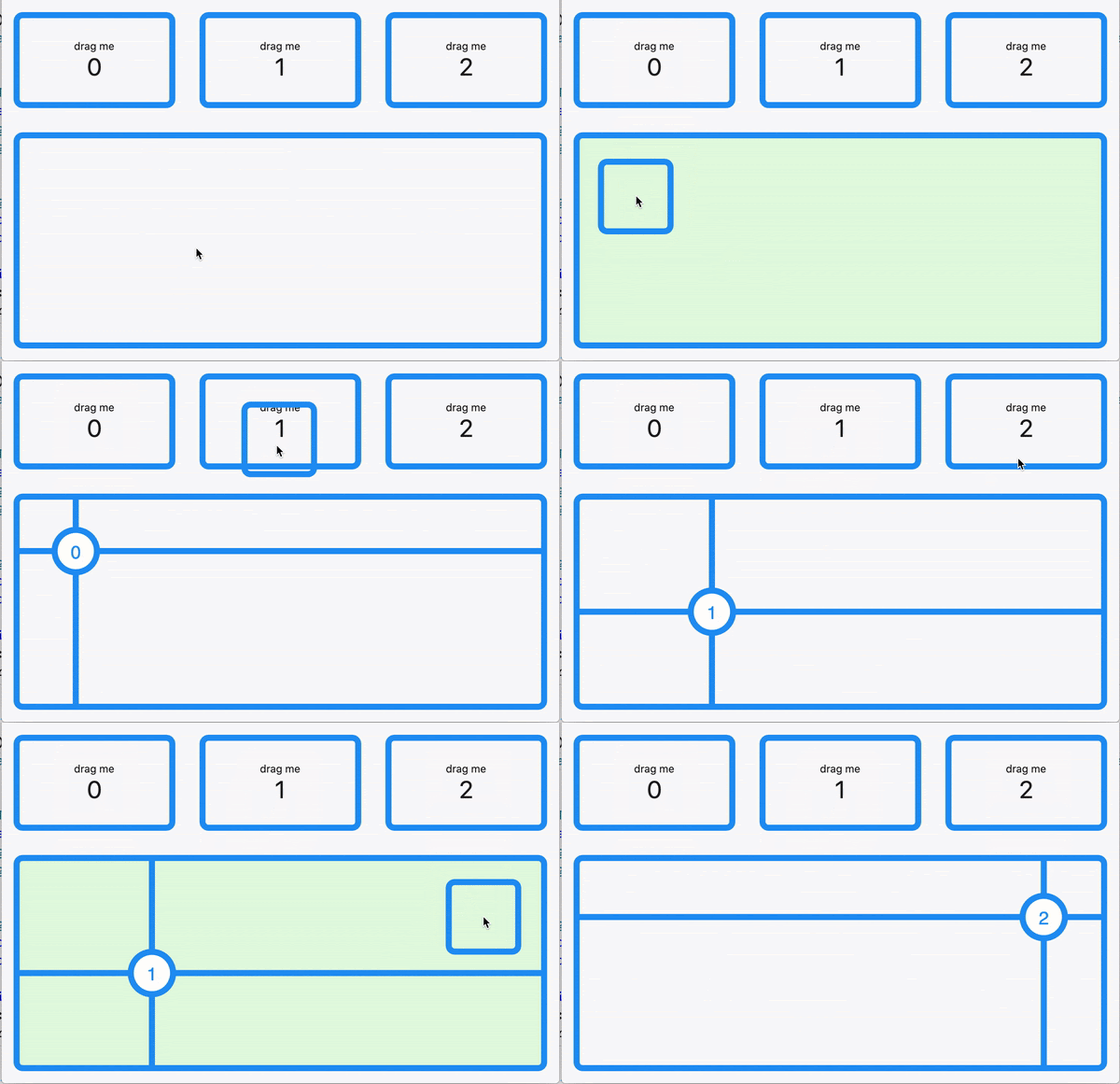
A New Similar Kind of update release is the newly added specific target ability to the Drag ’n’ drop making It precisedemonstrated in the example below :
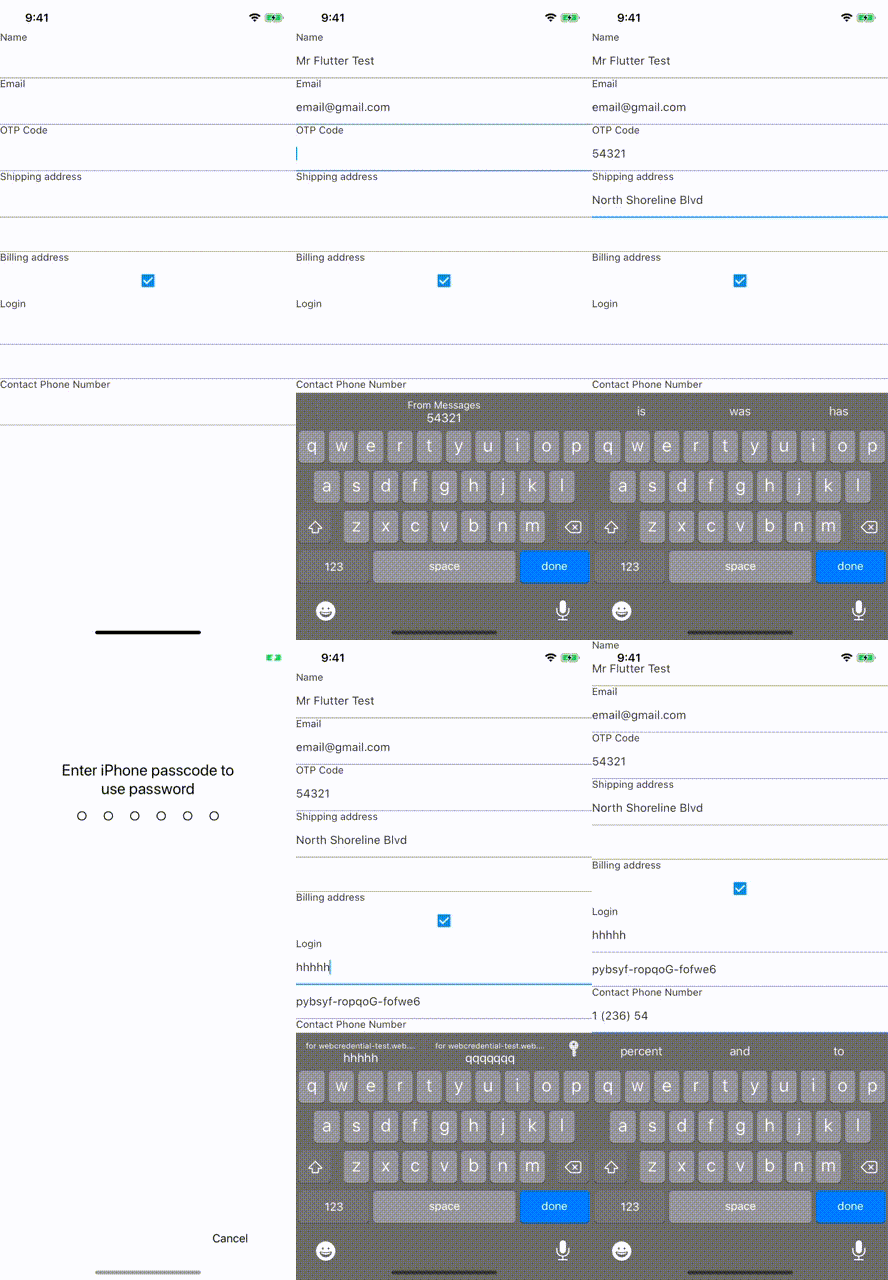
One of the Most Highly Anticipated Release update among the Developer Community is text autofill support in flutter apps. With Flutter 1.20, Flutter has added the basic autofill functionality so that — no further need to re-enter data already gathered by OS.
Autofill Support for Web Apps is also on the Further Updates lined-up
Mobile Autofill Support In Flutter Apps
Slider & Range Slider Update
Slider and RangeSlider have been updated in the newly version keeping in sync with the Material guidelines.
New Discrete SliderWith Value Indicator
Check Out the Medium Article to Know About All New In Sliders :
A Command Line Tool Pigeon, at which the messaging protocol is defined in a subset of Dart which then generates messaging code for Android or iOS forming the communication between the two — Flutter & Host Platform safer and easier for pluginsandAdd-to-App is developed for Platform Interops.
Pigeon example
Pigeon file:
import 'package:pigeon/pigeon.dart';
class SearchRequest {
  String query;
}
class SearchReply {
  String result;
}
@HostApi()
abstract class Api {
  SearchReply search(SearchRequest request);
}
Though Pigeon is still in the Pre-Release phase, You can Try it out In Your Projects with the Documentation & Sample Project Lending you a Helping Hand.
Make your apps more stable and performant with Dart’s null safety. Sound null safety is a distinctive feature of Dart that helps you write less error-prone code and get better performance.
Dart is a type-safe language. This means that when you get a variable of some type, the compiler can guarantee that it is of that type. But type safety by itself doesn’t guarantee that the variable is not null.
The null safety feature makes this problem go away:
Try out the Null Safety Enable Dartpad to check the features : —
Check the following Github Project for Flutter Framework itself. This metadata is used for the Android studio, IntelliJ & VS Code Extensions by the flutter Team and Possibly by tool builders
:: Cupertino Icons and Colors are now rendered, Improved Outlines, performance fix for tree-shake-icons, Mouse Cursor Support, Improved Debug Discoverability in VS Code.
Unsupported Platforms Update: The flutter project will show enable option for Unsupported platforms.
Improved handling of Unsupported platforms
:: New Pubspec Format — New Pubspec format is required for further Updating | New Plugin Development as the old formats Inability Specifying platform Support for Plugins.
Check Out The NewPubspec.yamlformat required for publishing new/update Plugins :
Note: All Existing Plugins with the Old Pubspec format will Continue to work in the Existing future Without any Hindrance.
Closing Thoughts
Flutter 1.20 — Apparently Described as the biggest release in the Flutter history. The update release has created an igniting spark among the mobile developer’s Community by focussing well on varied Important Aspects.
Though Each New Release Certainly Brings with In Increased usage and momentum Which can be easily seen that the number of Flutter apps in play store reached from an astonishingly 50k to 90k in the span of mere 3 months. Also, Flutter being well supported by the Dart which has now moved up further to the #12 in the top 50 languages: reported by IEEE
What makes it more special for us is that Our Country, India now being the #1 region for Flutter developers, having doubled in the last six months
Much More Yet To Come:Enhanced Null Support, a new version of the Ads, Maps, and WebView plugins & Tooling Updates.
Trusted across industries like manufacturing, healthcare, logistics, BFSI, and smart cities, Aeologic combines innovation with deep industry expertise to deliver future-ready solutions.
Feel free to connect with us: And read more articles fromFlutterDevs.com
FlutterDevs team of Flutter developers to build high-quality and functionally-rich apps. Hire flutter developer for your cross-platform Flutter mobile app project on an hourly or full-time basis as per your requirement! You can connect with us on Facebook, GitHub, Twitter, and LinkedIn for any flutter related queries.
Wewelcome feedback and hope that you share what you’re working on using #FlutterDevs. We truly enjoy seeing how you use Flutter to build beautiful, interactive web experiences.
Welcome to one of the best ways of managing UI logic, forget all about stateful widgets and the amount of unreadability as you pile hundreds of functions into initState() or call setState() hundred times. So, that brings us to a question of what hooks are exactly?
Hooks came from React Native, if you want to learn more about them
With them in react you could use state features without writing a class, So what do they do in flutter then?
well, their main use is for readability and clear the clutter in your state classes, they use something called HOOKWIDGET, now with stateful widgets, you can only have one state but with Hookwidget you can have multiple hooks attached to one HookWidget each containing its own logic.
Hooks are kept inside a List and are managed on their own so you don’t need to initialize them or dispose of them(well not the prebuilt ones anyway)
There are prebuilt Hooks and Custom hooks that we can use.To get a better understanding of Hooks lets just jump into code
we are simply trying to Fade the flutter logo when the user taps on Screen, just create an animation controller and an Animation and call _animationController.forward(), to make it run.
see the lack of initState(), or even the dispose()?
So why is it that we need to declare them in stateful widget yet we can freely use useAnimationController() in the HookWidget?
Well, the answer to that question is simple, in HookWidget all the different hooks we create like the useAnimationController they are managed by Hook that is to say that their intialization and dispose is taken care of and we don’t need to get our hands dirty by writing them on our own:
Suppose if I had to create 2 TextEditingControllers in this project as well I would’ve had to dispose them and then the dispose method would’ve been cluttered, now imagine this for a project on a huge scale where multiple people are working on it, imagine you had to put so many functions in the initState or call setState so many times that it takes a while just to read and understand the code and then make changes to a particular part of the program, there is a chance you may even break something trying to fix something else which would consume even more time.
So that is why Hooks are the perfect solution provided to us so that we do not run into this particular problem. Another benefit of using hooks is re-usability, after creating your custom hook you can reuse it as much as you would like.
NOTE: Always create the hooks in build method.
CREATING CUSTOM HOOKS
let’s say you want the animation you just created to show up when you scroll the page?
Simple right you will just create a scroll controller and in initState just define it to do that, but what if you had to do the same thing on like 5 or 6 different screens? nobody would write the same stuff 5–6 times just for it to work, that’s where hook comes in and saves your day. Lemme show you how :
How would you do that in normal Stateful Widget?
class Home extends StatefulWidget { @override _HomeState createState() => _HomeState(); }
class _HomeState extends State<Home> with SingleTickerProviderStateMixin{ AnimationController animationController; Animation<double> animation; ScrollController scroller;
So, I have made a simple example of when you scroll the animation plays, and when you scroll in reverse direction the animation also plays in reverse, its simple code but if you have no practice with ScrollController then you might wanna check out :
Alright now that you are familiar with ScrollController class we can focus on how to get this done with the help of a CustomHook
While it may sound difficult thing to do its really not,
so i have created another file called customScroll where i have created a class called HookScroll which extends Hook<ScrollController>, now just like in a normal stateful class you need to create an createState().
TIP : Just create a normal stateful class in your project then modify it with the code i m about to paste, will save a lot of time
Now create a _HookScrollState which will HookState which will have 2 generics one of ScrollController and the other of the class it will be the state of HookScroll , So it will go like this
class _HookScrollerState extends HookState<ScrollController,HookScroller> {
Now we will create a normal ScrollController instance, and in initState for a hook called the initHook we will define it
the scrollAnimation is a function defined by me but you can just create it inside scrollController’s addListener i just like to keep my functions seperate, here is the code for it
With this we can make a scroll work, just one little problem tho if you try to make an instance of it, It will give you an error, why is that?
Well when you call a HookWidget inside a class that extends Hook,it does that by calling Hook.use, so to fix this you can click on useAnimationController() method we created while holding ctrl button on the keyboard to visit this function, as you can see how that function returns a Hook.use with _AnimationControllerHook, so we have do perform the same with our custom Hook.
To do this outside of the classes of our HookScroller and _HookScrollState create a method that will return a ScrollController which will need the value of an animation controller called controller
See the highlighted above and do the same in your code, or you can copy-paste it, I leave that decision up to you With this, we are done. now we can have it play our animation every time we scroll
If you wanna say that this is too much boilerplate code compared to what we had in StatefulWidget…. well, I agree, if I just have to make it for one screen alone then I won’t make a hook for it and just work with a stateful widget, but if I have to use that animation in like 3–4 screens nothing would be better than a CustomHook.
If you are facing any problem implementing Hook, contact me i will try to help to the best of my ability
You can find the full code and more amazing stuff at :
Trusted across industries like manufacturing, healthcare, logistics, BFSI, and smart cities, Aeologic combines innovation with deep industry expertise to deliver future-ready solutions.
Feel free to connect with us: And read more articles fromFlutterDevs.com
FlutterDevs team of Flutter developers to build high-quality and functionally-rich apps. Hire flutter developer for your cross-platform Flutter mobile app project on an hourly or full-time basis as per your requirement! You can connect with us on Facebook, GitHub, Twitter, and LinkedIn for any flutter related queries.
Wewelcome feedback and hope that you share what you’re working on using #FlutterDevs. We truly enjoy seeing how you use Flutter to build beautiful, interactive web experiences.
In this blog, we shall discuss about handing authentication exception. When the user signs in or signup he might get some error but if we do not handle those errors the user will not be able to know about the authentication failure. So it is very important to handle those errors and display a message or alert so that the user can change his credentials as per the requirement of the error.
: TextFormField provides us validator property to show an error if the email is empty or it does not contain @. You can add as many error messages you want using nested if-else.
Password TextField
TextFormField(
  key: ValueKey('password'),
  validator: (value) {
    if (value.isEmpty || value.length < 7) {
      return 'Password must be at least 7 characters long.';
    }
    return null;
  },
  obscureText: hidePassword,

)
Handle Platform exception
This handle the error of different platforms such as android and ios
try {
  if (isLogin) {
    userCredential = await _auth.signInWithEmailAndPassword(
      email: email,
      password: password,
    );
  } else if (password == confirmPassword) {
    userCredential = await _auth.createUserWithEmailAndPassword(
      email: email,
      password: password,
    );
  } else {}
} on PlatformException catch (err) {
   authProblems errorType;
  if (Platform.isAndroid) {
    switch (e.message) {
      case 'There is no user record corresponding to this identifier. The user may have been deleted.':
        errorType = authProblems.UserNotFound;
        break;
      case 'The password is invalid or the user does not have a password.':
        errorType = authProblems.PasswordNotValid;
        break;
      case 'A network error (such as timeout, interrupted connection or unreachable host) has occurred.':
        errorType = authProblems.NetworkError;
        break;
      default:
        print('Case ${e.message} is not yet implemented');
    }
  } else if (Platform.isIOS) {
    switch (e.code) {
      case 'Error 17011':
        errorType = authProblems.UserNotFound;
        break;
      case 'Error 17009':
        errorType = authProblems.PasswordNotValid;
        break;
      case 'Error 17020':
        errorType = authProblems.NetworkError;
        break;
      // ...
      default:
        print('Case ${e.message} is not yet implemented');
    }
  }
Scaffold.of(ctx).showSnackBar(
  SnackBar(
    content: Text($errorType),
    backgroundColor: Theme.of(ctx).errorColor,
  ),
);
}
Handling both platform error using a single code
var errorMessage; final _auth = FirebaseAuth.instance;
Here we are directly displaying the error message using a snack bar. If the error message is null then ‘An error occurred, please check your credentials!’ message will be displayed. If an error message is not null then message = err.message; .
class _AuthFormState extends State<AuthForm> { final _formKey = GlobalKey<FormState>(); var _isLogin = true; var _userEmail = ''; var _userName = ''; var _userPassword = ''; var _confirmPassword = ''; File _userImageFile; bool hidePassword = true;
Trusted across industries like manufacturing, healthcare, logistics, BFSI, and smart cities, Aeologic combines innovation with deep industry expertise to deliver future-ready solutions.
Feel free to connect with us: And read more articles fromFlutterDevs.com
FlutterDevs team of Flutter developers to build high-quality and functionally-rich apps. Hire flutter developer for your cross-platform Flutter mobile app project on an hourly or full-time basis as per your requirement! You can connect with us on Facebook, GitHub, Twitter, and LinkedIn for any flutter related queries.
Wewelcome feedback and hope that you share what you’re working on using #FlutterDevs. We truly enjoy seeing how you use Flutter to build beautiful, interactive web experiences!.
In this blog, we shall explore how to use the ValueListenableBuilder widget. It is an amazing widget. It builds the widget every time the valueListenable value changes. Its values remain synced with there listeners i.e. whenever the values change the ValueListenable listen to it. It updates the UI without using setState() or any other state management technique.
Properties:
valueListenable:
builder:
child:
These are the three properties of ValueListenableBuilder. bulder build widget depending upon the valueListenable value. valueListenable is an instance of ValueNotifier . child property is optional, it can be null if valueListenable value entirely depends upon the builder widget.
Example:
Creating a AppValueNotifier class.
class AppValueNotifiier{}
ValueNotifier
class AppValueNotifiier{
  ValueNotifier valueNotifier = ValueNotifier(0);
}
Creating an increment function
class AppValueNotifier{
  ValueNotifier valueNotifier = ValueNotifier(0);
We have created two valueNotifier for increment and decrement, one for color, and one for subtraction operation. We will change the color of the container, the increment and decrement counters, and the substation of both the counters.
Trusted across industries like manufacturing, healthcare, logistics, BFSI, and smart cities, Aeologic combines innovation with deep industry expertise to deliver future-ready solutions.
FlutterDevs team of Flutter developers to build high-quality and functionally-rich apps. Hire flutter developer for your cross-platform Flutter mobile app project on an hourly or full-time basis as per your requirement! You can connect with us on Facebook, GitHub, Twitter, and LinkedIn for any flutter related queries.
Wewelcome feedback and hope that you share what you’re working on using #FlutterDevs. We truly enjoy seeing how you use Flutter to build beautiful, interactive web experiences!.
Dart supports four types of collection with full-featured API. List, Set, Queue, Map are the four types of collection in Dart programming language. List, Set, Queue are iterable while Maps are not. Iterable collections can be changed i.e. their items can be modified, add, remove, can be accessed sequentially. The map doesn’t extend iterable.
Iterable
Iterable is an extract class, it can’t de instantiate directly.
The difference with List and Iterable is that that element in the list can be accessed with their index value using [] operator while in Iterable value can’t be accessed using [] operator.
If we run the above program. We get the operator error.
Error compiling to JavaScript:
main.dart:4:13:
Error: The operator '[]' isn't defined for the class 'Iterable<int>'.
- 'Iterable' is from 'dart:core'.
print(var1[1]);
^
Error: Compilation failed.
1
4
4
true
(2, 3, 4)
Uncaught Error: Bad state: Too many elements
firstreturn the first element, last return the last element, length return the length of iterable, contains(1) return the element at position 1, skip(1) skip the element at position 1, single return the element if iterable has only one element. Throw this error if it has more than one element or empty Uncaught Error: Bad state: Too many elements .
List
A list is an array of elements arranged in an ordered sequence.
There are two types of List:
Fixed-Length List
Growable List
Fixed-Length List is a list that can’t be changed once initialized whereas the Growable list is dynamic in nature.
Fixed-length List
Creating a Fixed-length List
void main() {
  List<String> list = List(5);
}
The indexing value start with 0 and end with listOfLength-1 . So for the list index values will be 0 to 4 .
Here the list is empty, so let’s assign the value for each index:
A set is an unordered collection of values. We can’t get the values by their index values as they are unordered. Values in set are unique i.e. they can’t be repeated.
Creating a Set using a constructor:
void main() {
  Set<int> set = Set();
}
Creating a Set using List
void main() {
  List<int> list = [1, 2, 3, 4];
  Set<int> set = Set.from(list);
}
Inserting elements in Set
void main() {
  List<int> list = [1, 2, 3, 4];
  Set<int> set = Set.from(list);
  set.add(5);
  set.add(6);
}
Maps
Maps is an unordered pair of key and values. The keys of the map must unique, values can be the same. Map is also called dictionary or hash .The size of a map is not fixed, we can add, delete edit the values of the map. The size of the map depends upon the number of elements in the map. The values in the map can only be accessed through the key name, not by the index values.
Creating a map using constructor:
void main() {
  Map<String, int> map = Map();
}
Here we have created a map named map whose key type is String and value type is int .
Trusted across industries like manufacturing, healthcare, logistics, BFSI, and smart cities, Aeologic combines innovation with deep industry expertise to deliver future-ready solutions.
FlutterDevs team of Flutter developers to build high-quality and functionally-rich apps. Hire flutter developer for your cross-platform Flutter mobile app project on an hourly or full-time basis as per your requirement! You can connect with us on Facebook, GitHub, Twitter, and LinkedIn for any flutter related queries.
Wewelcome feedback and hope that you share what you’re working on using #FlutterDevs. We truly enjoy seeing how you use Flutter to build beautiful, interactive web experiences!.
In this blog, we shall learn about various Null-aware operators, where to use const keyword, async, and await. Dart is a powerful language that provides us, various special operators, keyword. Operators are the special characters that are used to perform various operations on the operants. There are four null-aware operators that are used to handle the null values. const keyword is used to reduce the rebuild of const object every time.
Null- aware Operators
Operators that deals with values that might be null during runtime are called Null-aware Operators.
?. operator
This operator is used when you call a method on an object if that object is not null.
Eg. If we have a String value , we want to return null if it is null and if not then value.toLowerCase() , then we can use value?.toLowerCase() .
It is equivalent to value ==null?null:value.toLowerCase() .
In the first program, the output is Hi! while in the second program the output is 2 . As we can see in the first program the value of the string is not null that is why it has returned the left part of the statement string ?? string??2 . While in the second program string is null hence it has returned the right part of the statement i.e. 2
… operator
This operator is amazing. It adds a list that is not null with the other list of the same type.
const keyword in dart is highly effective to use as
It increases the performance of our app.
Reduce CPU load.
Allocate only one memory space.
Using const keyword while construction an objectconst Text("Hi!"), while creating a collection const [3,4,2,5] .
If we use const like this, it will work absolutely fine.
void main() {
  const int value = 2;
  const int _value = 3;
  const int result = value + _value;
  print(result);
}
But if we use const DateTime.now() , this will not work as it changes and it needs to be rebuilt every time the user opens the app. We will get the following error.
The constructor being called isn’t a const constructor. Try removing ‘const’ from the constructor invocation.
: A const constructor can’t be assigned for a class.
: If you repeat the const object in the same class it will reuse the same object created for the first time.
: The const objects are frozen and completely Immutable.
: Const variables are implicitly final i.e. Compile-time constant.
What is async and await ?
These two keywords are highly useful for updating our UI while processing our data. Example if we use authentication in our app then while signing up, signing in, logout there is a small-time delay while performing these operation, so it would be nice if we can display a loading spinner while these operation gets executed.
For this purpose, we can use async and await keyword in our authentication code and we can build our logic for displaying our logic.
While creating a function for authentication make that function asynchronous by using the async keywordauth()async{} . await is used to show up the Circular Progress Indicator until the Code Execution is Completed.
auth()async{
   //set the loading spinner state   var signIn = await authentication();
   //reset the state of loading spinner
}
Thanks for reading this article ❤
If I got something wrong? Let me know in the comments. I would love to improve.
Clap 👏 If this article helps you.
If we got something wrong? Let me know in the comments. we would love to improve.
Trusted across industries like manufacturing, healthcare, logistics, BFSI, and smart cities, Aeologic combines innovation with deep industry expertise to deliver future-ready solutions.
FlutterDevs team of Flutter developers to build high-quality and functionally-rich apps. Hire flutter developer for your cross-platform Flutter mobile app project on an hourly or full-time basis as per your requirement! You can connect with us on Facebook, GitHub, Twitter, and LinkedIn for any flutter related queries.
Wewelcome feedback and hope that you share what you’re working on using #FlutterDevs. We truly enjoy seeing how you use Flutter to build beautiful, interactive web experiences!.
Implementing animation into your app might be the best idea to make your app more smooth, polished, slick, and nice. In flutter using animation is quite simple.
In general, flutter provides us two types of animation — Tween animation and Physics-based animation. Tween animation is used if we want to animate a widget with a fixed start and finish. While Physics-based animation relies on the user interaction.
Tween is an object that takes a start value and an end value. Value can be anything like color, opacity. We can use Tween to change the color of appBar from blue to pink or any other colors. The change in color is handled by the Animation library. The Tween value lies between 0.0 to 1.0.
Tween( begin: 0.0, end: 1.0, );
Animation curves
Animation curves are used to define to flow rate of animation. It fixes the path of animation, allows the animation to speed up or slow down at a specific point. Flutter provides us Curves class. The default curve is linear. Curves class is packed with a variety of curves path eg. easeIn, elasticIn etc.
Ticker Providers
Ticker can be used by the object that needs to be notified every time the frame changes triggers. TickerProviderclass provides a ticker for the widget.
class _MyAnimationState extends State<MyAnimation>
    with TickerProviderStateMixin {
  @override
  Widget build(BuildContext context) {
    return Container();
  }
}
AnimationController
By the name, we can understand that it’s a controller that controls the animation. This object has so many properties. The object must be initialised inside the initState() of the class.
This is an example to create your first animation. Here I have just used all the above topics. So let me summarize the whole scenario.The first step is to add TickerProviderStateMixin to the state class of StatefulWidget. Then create a AnimationController that we will use to perform various actions with the animation. Then you need to initialize a AnimationController object that is use to pass the current class context and duration and any more. To pass the Tween create a Animation and pass ColorTween object (inside the initState() method) that takes the start and end color that we need to change while animating the container colors. Then add animate() ,this allows Tweens to be chained before obtaining an Animation. Now forward that AnimationController , so that it can get started with animation _animationController.forward(); .
Adding curve in animation:
CurveAnimation() creates a curved animation. It takes a parent, curve arguments. parent takes a AnimationController and curve takes a Curve .
Trusted across industries like manufacturing, healthcare, logistics, BFSI, and smart cities, Aeologic combines innovation with deep industry expertise to deliver future-ready solutions.
FlutterDevs team of Flutter developers to build high-quality and functionally-rich apps. Hire flutter developer for your cross-platform Flutter mobile app project on an hourly or full-time basis as per your requirement! You can connect with us on Facebook, GitHub, Twitter, and LinkedIn for any flutter related queries.
Wewelcome feedback and hope that you share what you’re working on using #FlutterDevs. We truly enjoy seeing how you use Flutter to build beautiful, interactive web experiences!.
HI, everyone I am glad to be back with another topic, this time i will be covering Headless CMS with flutter.
So, What is Headless CMS, or rather lets start from what is CMS itself.
CMS stands for Content Management System. It helps by controlling what content to be shown to user, content mostly is managed by people who don’t have much knowledge about the code, so for them it might look like just a basic form where they put in data, the data get stored in Database and then our app extracts that data from Database and displays to user. It is useful because all the content can be managed separately and would not need to be coded in manually, so that even for a smallest change you won’t have to waste time to search where you put in that particular string and then change it.
Now, coming to Headless CMS
The “Headless” is the new approach towards CMS whereas in the traditional CMS it was mostly coupled with a web page but, this new approach helps to widen that horizon and makes it so that content can be displayed on any device of users choice.
The devices are called “Heads” and since there are many devices so that means there is not a single fixed head.
This approach is better and an overall improvement over traditional CMS.
The way it works is that it provides us an API for all of our data and if we like we can use that directly in our project to show changes to user, Hence why this approach is better than traditional CMS
What will we be using for this short demo?
For this short demo on Headless CMS approach we will be using StoryBlok.
It provides you an API with all your data you have entered into it.
I won’t go into too much detail over this -but all you need to do is create your own space and then define schema and then publish that in the content and go to settings to generate your token and then get the API.
That’s basically it!
Now to get onto the coding part!
How to handle API ?
There are multiple ways of handling an API call in flutter, but the simplest would be to use the http package from pub.dev, just paste that in the pubspec.yaml file.
http: any
That’s all you needed to do. Now to use this package we will import it as below
import 'package:http/http.dart' as http;
We have added as “http” there so that we can use its functions with ease,
Now to make an API call we can do that by making a separate function called _fetch() and make it asynchronous.
_fetch() async {

}
Now inside that function we need to make a variable that will help us get the response from the API so we will call that response.
Its type would be of http.Response, its always better to define the types,
and to give this variable value, It will have the value of http.get(“ <YOUR API HERE>”);.
Be sure to put in await before that so that we can wait for it to get the response from the API
_fetch() async {
  final http.Response response = await http.get("https://api.storyblok.com/v1/cdn/stories?page=1&token=5kNqPrD6wYQRHakzUrxrGwtt");
}
Now once we are done with the API call and have gotten the response we need to check if that response was correct or not and we do that by accessing a property of http.Response type variables that is statusCode
We make a simple check that if the statusCode was 200 then no error occurred and we got the response we desired.
if(response.statusCode ==200) {

// YOUR FUNCTION BODY HERE
}
for now once we get the API response and the statusCode is 200 lets decode it.
For that we will use an inbuilt method called jsonDecode(<YOUR RESPONSE VARIABLE>)
final Map<String,dynamic> json = jsonDecode(response.body);
We have accessed the body of the response we got and have gotten that body part into a json variable which is of type Map<String,dynamic>.
now we can just print the json and get all the data we require, to use the data we can use it like we use any other map
However i recommend making a Modal class for dealing with this, an example would be
class Fetch { final name; final created; final published; final alternates; final id; final uuid; final content; final slug; final full_slug; final default_full_slug; final sort_by_date; final position; final tag_list; final isStartPage; final parent_id; final meta_data; final release_id; final lang; final path; final translated_slugs;
So we have defined all the keys in the map as a variable here and we are gonna make an object of this Modal class and use that object to show what we want from the json data.
If you want more help making a Modal class you can contact me anytime you like
Now how we provide data from json to it?
Its beyond simple really i usually do it like this
List list = json['stories'];
print(list);
list.map((i) {
  Fetch fetch = Fetch.fromFetch(i);
  print(fetch.id);
  print("fetch name => ${fetch.name}");
}).toList();
Well in my json ‘stories’ was a key which had a List as its value so i made this so i can get the data of all list items into my modal class and print them,
You can declare another List of type Fetch and add in it the fetch instance so that you can use it whenever you like,
Example
List<Fetch> fetchList =[];
List list = json['stories'];
print(list);
list.map((i) {
  Fetch fetch = Fetch.fromFetch(i);
  fetchList.add(fetch);

}).toList();
Now this makes our work much, much easier. Instead of writing the key in strings over and over again we can simply use it like fetchList[0].name or fetchList[0].id etc.
Now all that is left is to either bind it to a button or if you want to run it at app startup then call the function in initState();
As always you can find the full code for this in the GitHub. Hope you guys enjoyed reading through this, If you have any queries be sure to let me know, and i will try to solve them.
Trusted across industries like manufacturing, healthcare, logistics, BFSI, and smart cities, Aeologic combines innovation with deep industry expertise to deliver future-ready solutions.
Feel free to connect with us: And read more articles fromFlutterDevs.com.
FlutterDevs team of Flutter developers to build high-quality and functionally-rich apps. Hire flutter developer for your cross-platform Flutter mobile app project on an hourly or full-time basis as per your requirement! You can connect with us on Facebook, GitHub, Twitter, and LinkedIn for any flutter related queries.
Wewelcome feedback and hope that you share what you’re working on using #FlutterDevs. We truly enjoy seeing how you use Flutter to build beautiful, interactive web experiences.
Authorization and Authentication in your apps plays an important role and we’re very well aware of the fact in day-to-day acitivities. Motsly every app that we install needs you to authenticate yourself before you could use it and same goes for authorization. In Flutter we have been doing this using Firebase
What’s AWS Amplify ?
AWS Amplify is a set of tools and services that enables mobile and front-end web developers to build secure, scalable full stack applications, powered by AWS. With Amplify, it’s easy to create custom onboarding flows, develop voice-enabled experiences, build AI-powered real-time feeds, launch targeted campaigns, and more. No matter the use case, AWS Amplify helps you develop and release great apps your customers will love. AWS Amplify includes an open-source framework with use-case centric libraries and a powerful toolchain to create and add cloud-based features to your app, and a web hosting service to deploy static web applications.
Install the Flutter Developer Preview of the Amplify CLI using the command below:
npm install -g @aws-amplify/cli@flutter-preview
Note: If you don’t have nodejs and npm already installed, please use install Npm and NodeJs beforehand. Also,an already existing install of @aws-amplify/cli wont work, you may need to install flutter-preview version.
You need to sign up for an AWS account if you don’t already have it.
Integrate Amplify into your app:
Now, here for this demo, I’m going to use the Auth flow of the app using AWS which generally I use to do using Firebase before so I’m assuming that you have the demo UI for the Sign-Up and Sign-In flow ready as I won’t be going to the UI part here.
Import Amplify packages into your project inside the pubspec.yaml file:
amplify_core:  latest version
amplify_auth_cognito: latest version
Fetch the Amplify packages entered above using the below command:
flutter pub get
To make sure you have installed the proper amplify cli version run the below command:
amplify --version
Note: The output of this command should have “-flutter-preview” appended to it. If not, then run “npm install -g @aws-amplify/cli@flutter-preview” in the terminal.
Now that you have the correct version of amplify installed, it’s time to connect to the AWS cloud and for that, we need to initialize the amplify, use the following command to initialize the Amplify:
amplify init
The next step is to configure the user for AWS. This will help create a new user or set an already created user for this project. Use the following command to configure AWS:
amplify configure
AWS User creation process
What is AWS Cognito?
Amazon Cognito lets you add user sign-up, sign-in, and access control to your web and mobile apps quickly and easily. Amazon Cognito scales to millions of users and supports sign-in with social identity providers, such as Facebook, Google, and Amazon, and enterprise identity providers via SAML 2.0.
This will help set up social sign-in, user authentication which we are going to integrate into our demo. The AWS amplify category has a default, built-in support for the AWS Cognito.
Prerequisites:
A Flutter application with Flutter SDK ≥1.20 and Amplify libraries integrated as mentioned above.
Configurations:
To start using the auth resources into your project run the following command into the terminal
amplify add auth
You’ll be prompted with few questions to configure the auth preferences just go with the defaults,
? Do you want to use the default authentication and security configuration? `Default configuration`
? How do you want users to be able to sign in? `Username`
? Do you want to configure advanced settings?  `No, I am done.`
After the auth configuration has been set you need to push all these changes made till now to the cloud and for that, you can use the below command,
amplify push
Auth using Amplify:
Now that the basic setup has been done and if everything did go well then you can proceed ahead with the Auth flow integration into your UI for registration and sign-in .
For SignUp:
Just like you use to handle Firbase Auth flow in the signup screen, just need to implement AWS api calls.
Now, the user will be confirmed. For that, a confirmation code will be sent to the email address by the user. You need to create a separate UI for the confirmation code as the user have to enter the code received in his/her email and will passed to the confirmSignUp call.
try {
  SignUpResult res = await Amplify.Auth.confirmSignUp(
      username: "myusername",
      confirmationCode: "123456"
  );
} on AuthError catch (e) {
  print(e);
}
Upon the successful completion of signup flow you can see Confirm signUp Succeded message on the terminal.
For SignIn:
In the SignIn UI, imlement the AWS signIn api calls.
try {
  SignInResult res = await Amplify.Auth.signIn(
    username: usernameController.text.trim(),
    password: passwordController.text.trim(),
  );
} on AuthError catch (e) {
  print(e);
}
Upon the successful completion of signin flow you can see Sign in Succeded message on the terminal.
Trusted across industries like manufacturing, healthcare, logistics, BFSI, and smart cities, Aeologic combines innovation with deep industry expertise to deliver future-ready solutions.
Feel free to connect with us And read more articles from FlutterDevs.com
FlutterDevs team of Flutter developers to build high-quality and functionally-rich apps. Hire flutter developer for your cross-platform Flutter mobile app project on an hourly or full-time basis as per your requirement! You can connect with us on Facebook, GitHub, and Twitter for any flutter related queries.